Managing your social calendar just got much easier.
With our latest update, retailers can now discover and schedule content directly from the Schedule tab, eliminating the need to jump between tabs and making it faster than ever to schedule your social strategy.
A Faster Way to Fill Your Calendar
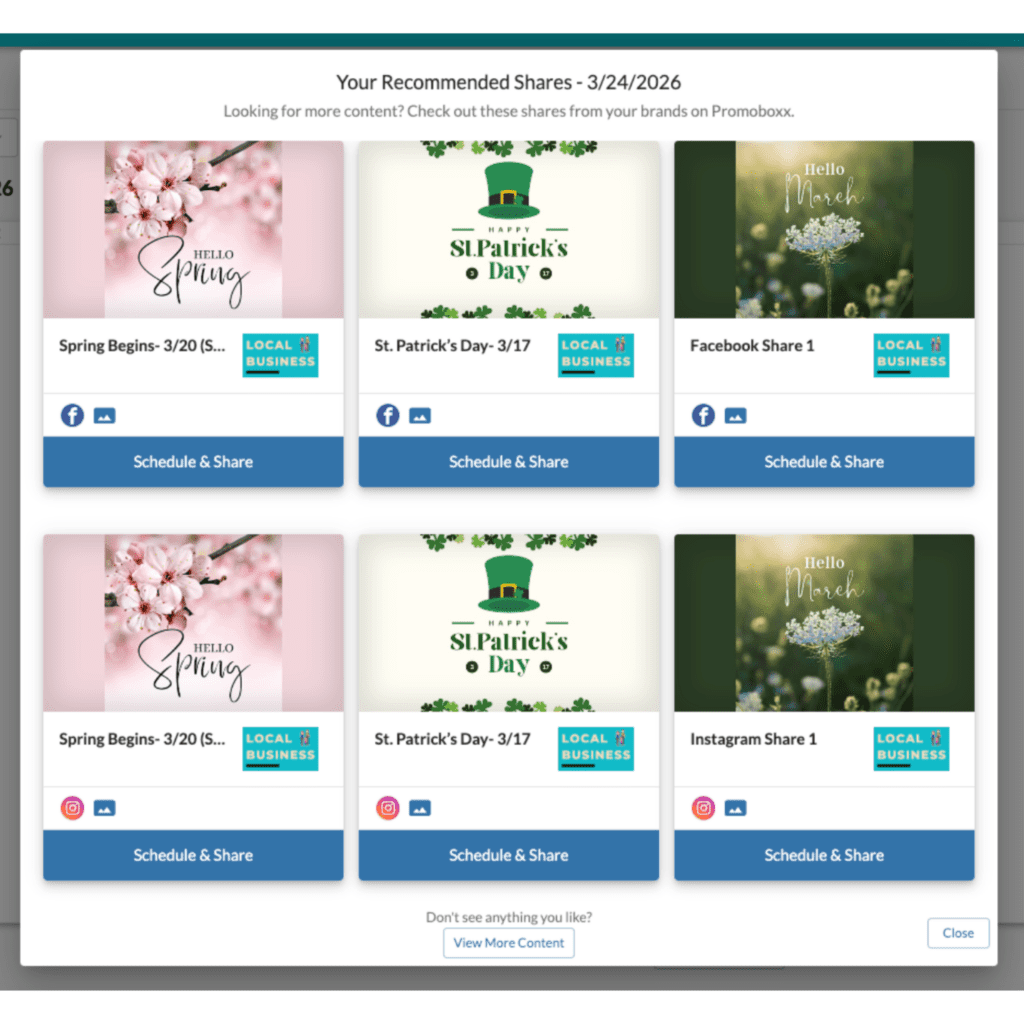
When you spot an open day in your Schedule, simply click the new Add button. Instantly, you’ll see a set of curated content recommendations tailored specifically to you and that date.
From there, you can select a post and add it to your calendar in seconds.
Built-In Recommendations, Tailored to You
Each recommendation set is designed to help you share confidently and consistently. Content is selected based on:
- What’s performing well across other retailers
- Content you haven’t already shared or scheduled
- What’s available for that specific day
You’ll see up to 6 recommendations at a time, including:
- Up to 3 Facebook posts
- Up to 3 Instagram posts
- A balanced mix of content from the brands you work with
And if you want to explore further, you can always jump to your full Brand Content library.
Social Strategy Without the Extra Effort
This update removes one of the biggest friction points in social scheduling: finding the right content at the right time.
Instead of searching for posts, you can now discover and schedule high-performing content exactly when you’re planning your calendar, helping you stay consistent without adding extra work.
Try It Out
Head to your Schedule tab, look for an open spot, and click Add to start filling your calendar in seconds.